
Overview
Voices is where communities publish their own stories and maps about the territories they speak for. It appears in the header mode menu as Voices (Stories and maps from communities across the basin).
Unlike the other modes, Voices is a reading mode first. Anyone visiting the Atlas can browse what communities have chosen to make public — no account, no permission, no request. The voices grant only governs who can author.
Stories and Maps
A community publishes two kinds of work, and the panel keeps them in separate tabs.
Stories
A sequence of chapters a reader scrolls through. Each chapter can carry text, photos, video or audio, and its own saved map view, so the map travels with the reader as the story unfolds.
Maps
A set of places — points, lines, and areas — grouped under types that the community defines. Each type carries a color and a symbol, and the types become the legend a reader sees.
Both are anchored to one or more territories, and both are authored entirely by the community rather than assembled from Atlas data.
The Two Lenses
While in Voices mode, the header control switches between two lenses.
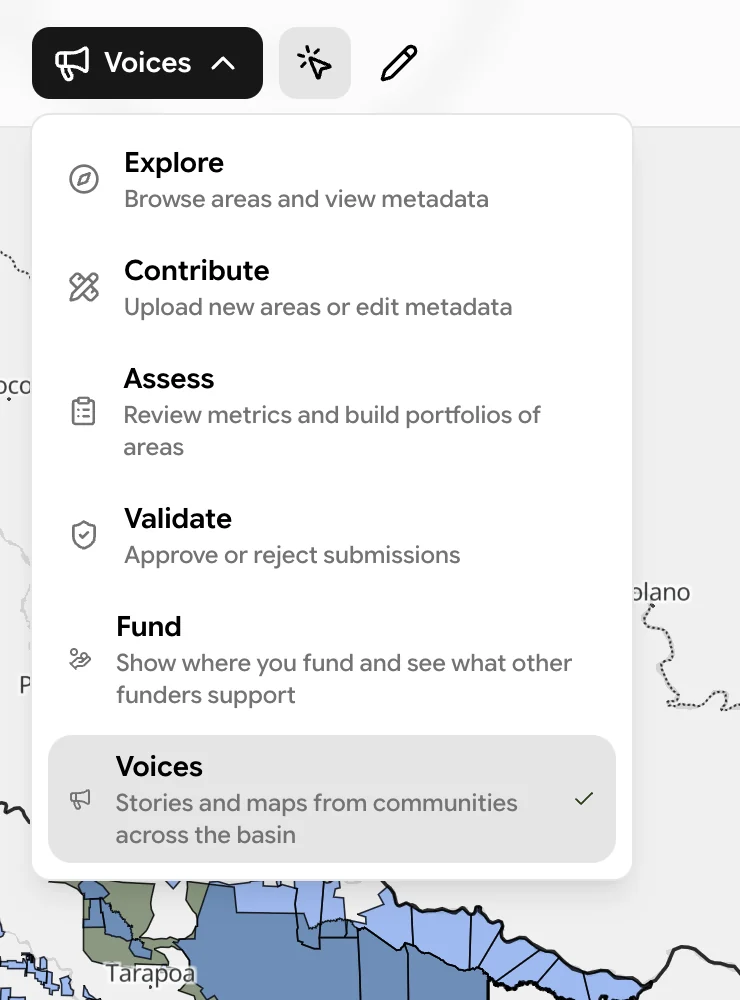
| Lens | Icon | What it does |
|---|---|---|
| View | pointer | Read what communities have published. Available to everyone. |
| Create or edit | pencil | Author a story or map. Only appears if you hold a voices grant. |
View is where you land. If you have no grant, the Create lens is simply absent from the toolbar — the panel explains that you can read what the community has shared but publishing needs a grant, and points you to a country validator if you represent the territory.
Territory Scoping
Voices is organized by territory rather than by author. Everything hangs off the polygons on the map: click a territory and the panel narrows to the works published for it, or pan the basin and the panel lists the works in view.
That scoping carries through to permissions. A voices grant is issued for specific territories, not globally, and a work can speak for several territories at once. The consequence is worth knowing before you start authoring:
On the map, the territories still available to add stay in color while the rest drop back, so the set you can legitimately speak for is visible rather than guessed at.
Published Work Needs No Approval
This is the significant difference between Voices and every other contribution path in the Atlas.
Metadata edits and new areas go to a validation queue and wait for a reviewer (Validation). Community works do not. When a community publishes a story or map, it is live — there is no review step, no approval, and no queue.
This follows directly from Data Sovereignty and Control: authority over what is said, and when, sits with the community rather than with a reviewer. Visibility is still fully under the author's control — see Visibility & Sharing.
Language
Works are shown in whatever language the community wrote them in, and are never machine translated. The language field labels a work rather than switching it, so a story authored in Spanish, Portuguese, or an Indigenous language reads as it was written, whichever interface language the reader has selected.
The Atlas interface chrome around it — buttons, tabs, hints — does follow the reader's language setting.
Getting Access
The voices capability is granted by Atlas administrators, and country validators can delegate it within the countries they validate. Grants are scoped to the territories a community actually speaks for.
If you represent a territory and want to publish, ask a country validator or an administrator. Reading requires nothing at all.